A group named AI4Bharat at IIT Madras has made IndicConformer, a set of models for automatic speech recognition (ASR) tailored towards Indian languages. I had been on the look out for a practically usable ASR for Malayalam. And the one from Indicconformer is quite nice. But the thing is, the instructions to set it up has become outdated. I guess the students who worked on it has moved on.
I could get it to work after trying out a few suggestions from google gemini. Here, I describe what worked.
Setup
The model
The Indicconformer model for Malayalam ASR is made using a set of
libraries from Nvidia called NeMo.
Download the model from here.
Since I am trying Malayalam, I am going with indicconformer_stt_ml_hybrid_ctc_rnnt_large.
Just keep this model in a convenient location. We will be using this
after everything else is set up.
The repo
Once we have the model, we need a pipeline that can make use of it. Folks behind IndicConformerASR have made a repo in here with the required material. We can use that.
I am on Debian 13, where the python version is 3.13.5. But the repo setup won't work with newer python. So I used pyenv to get hold of the older python 3.10.
# export PYENV_ROOT="$HOME/.pyenv
pyenv install 3.10.16
eval "$(pyenv init -)"

# Change python for current shell session
pyenv shell 3.10.16
To avoid clutter, we can use a virtual environment:
python3 -m venv nemo
source nemo/bin/activate
and start off by installing a few packages:
pip3 install torch torchvision torchaudio
pip3 install packaging
pip3 install huggingface_hub==0.23.2
Now clone the repo and do the rest of the commands mentioned in the project's website.
# Commit: 8dce88cf8e94963e2033c3137f7b9993b51db88a (on branch 'nemo-v2')
git clone https://github.com/AI4Bharat/NeMo.git
cd NeMo
bash reinstall.sh
This might take a while to finish.
Tweaks
Now we make a few small tweaks to make the code from the repo work.
NeptuneLogger
Apparently, newer pytorch don't expose the name
NeptuneLogger from a module that this repo expects. So got
to edit this file: nemo/utils/exp_manager.py
# Change this:
# from pytorch_lightning.loggers import MLFlowLogger, NeptuneLogger, TensorBoardLogger, WandbLogger
#
# To this:
from pytorch_lightning.loggers import MLFlowLogger, TensorBoardLogger, WandbLogger
Without this, we will get an error like this:
ImportError: cannot import name 'NeptuneLogger' from 'pytorch_lightning.loggers' (nemo/lib/python3.10/site-packages/pytorch_lightning/loggers/__init__.py)
Packages
Run this command to get the right set of package versions. (Output of
pip freeze is mentioned in this
github issue.)
pip install "datasets>=2.19.0,<3.0.0"
And we are done tweaking, and the installation procedure is complete.
Interface
Now that we have got the model ready to be run, we need an interface to use it. I figured a client-server setup would be good. With the server having the model loaded and ready to go, and the client asking it to transcribe audio whenever needed.
Gemini suggested fastapi and uvicorn. And I adapted it. It kind of looks as shown in Figure 1.
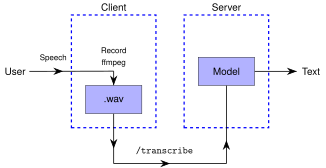
Steps involved:
- The user speaks
- ffmpeg records it into a
wavfile (NeMo expects 16KHz mono audio) - Client hits the
/transcribeend point on the server - Server transcribes audio to text and appends it to a pre-determined text file
We need a few additional packages for the server:
pip install fastapi uvicorn
Server
The server will load the model and keep it ready to service requests for transcription. It takes a while for the model to be loaded and the latency would be too much if we are to load the model from scratch each time.
Now for the python. Server looks like this:
from contextlib import asynccontextmanager
from fastapi import FastAPI, File, UploadFile, HTTPException
import torch
import nemo.collections.asr as nemo_asr

AUDIO_FILE_PATH = "out-stt-mal.wav"
MODEL_PATH = "/media/famubu/f9b396f5-5f46-465a-a1ee-5b008f58d5f9/data/Soft/ai-models/indicconformer_stt_ml_hybrid_rnnt_large.nemo"
asr_model = None

# Lifespan context manager: loads model once on server start
@asynccontextmanager
async def lifespan(app: FastAPI):
    global asr_model
    print("Loading IndicConformer model into memory...")
    device = torch.device("cuda" if torch.cuda.is_available() else "cpu")

    # Load model and configure for fast CTC decoding
    asr_model = nemo_asr.models.EncDecCTCModelBPE.restore_from(restore_path=MODEL_PATH)
    asr_model.change_decoding_strategy(decoder_type="ctc")
    asr_model.eval()
    asr_model.freeze()
    asr_model = asr_model.to(device)

    print(f"✅ Model successfully loaded on {device}!")
    yield
    print("Shutting down STT server...")

app = FastAPI(title="Malayalam STT Fast API Server", lifespan=lifespan)

@app.post("/transcribe")
async def transcribe_audio():
    transcriptions = asr_model.transcribe([AUDIO_FILE_PATH], batch_size=1, language_id="ml")
    text = transcriptions[0] if transcriptions else ""
    if isinstance(text, list) and len(text) > 0:
        text = text[0]

    return {"text": text}

if __name__ == "__main__":
    import uvicorn
    uvicorn.run(app, host="127.0.0.1", port=8000)
We need the 'patch' for numpy in the beginning of the above script to avoid this error:
AttributeError: `np.sctypes` was removed in the NumPy 2.0 release. Access dtypes explicitly instead.
This server can be started with:
python3 -m uvicorn server:app --host 127.0.0.1 --port 8000 < /dev/null
Client
The client would accept the audio input from the user, produce a recording of it as a 16KHz mono wav file, and request the server to transcribe it. The resultant text from the server is appended to a pre-determined file.
I made it as a simple bash script:
#!/bin/bash

# File name: client.sh

WAV_OUT="out.wav"
TXT_OUT="out.txt"

function record {
  echo "Recording..."
  ffmpeg -y -f pulse -i default -ac 1 -ar 16000 "$WAV_OUT"
  echo "✅ Recording complete."
}

function transcribe {
  echo "Transcribing..."
  curl -X POST "http://127.0.0.1:8000/transcribe" | jq -r .text >> "$TXT_OUT"
  echo "✅ Transcribing complete."
}

#

record
transcribe
Each time we need speech transcribed, we can run the client with:
bash client.sh
This will initiate a recording. Send a Ctrl-C when we
are done speaking so that the client can send the recording to the
server. Of course, the server has to be active before the client can be
run successfully.
If we already have a recording at out.wav, we can
manually send a POST request to server to transcribe it. Like this:
curl -X POST "http://127.0.0.1:8000/transcribe" | jq -r .text
Example run
We got everything ready. Let us try the ASR.
First we start the server:
python3 -m uvicorn server:app --host 127.0.0.1 --port 8000 < /dev/null
Once the server is up, we initiate a speech-to-text request:
bash client.sh
It will make a recording at out.wav and then append the
text to out.txt.
This is what I spoke to try it out:
ഈ സംവിധാനം പ്രവർത്തനക്ഷമമാണെന്ന് ഞാൻ പ്രതീക്ഷിക്കുന്നു
That's it. Enjoy!
Conclusion
The model does ASR quite well if we speak formal Malayalam. But accuracy drops drastically if we try colloquial Malayalam of any region. But this is definitely the best Malayalam ASR that I have come across so far and am happy with it. It can even transcribe place names, like കോഴിക്കോട്. Hope you too can try it out and that Indicconformer folks would keep updating their repos.
Thanks to:
- Team at AI4Bharat who worked on IndicConformer
- Google Gemini
Versions
- https://github.com/AI4Bharat/NeMo.git
- Commit:
8dce88cf8e94963e2033c3137f7b9993b51db88a(on branchnemo-v2)
- Commit:
indicconformer_stt_ml_hybrid_ctc_rnnt_large- Commit:
e96d81e42e5fe73f282b0322d422a48b461a4ca6
- Commit:
python 3.10.16ffmpeg v7.1.4curl v8.14.1jq v1.7
Addendum: CTC vs RNN-T decoding
Both are algorithms used for ASR. NeMo models can have both, like in
the case of the Indicconformer_Stt_Ml_Hybrid_Rnnt_Large model
that we used. CTC is said to be lighter, so I went with CTC
decoding.
| CTC | RNN-T |
|---|---|
| Connectionist Temporal Classification | Recurrent Neural Network Transducer |
| Faster and lighter | Slower and heavier |
| Bit less accurate | More accurate |
| Smaller model | Larger model |
| Does not rely on past output | Considers previous output too |
It would be nice to have the model as onnx files too, since they even more lightweight. But couldn't find any corresponding to the Indicconformer models online.